

Nuri
Ask Nuri to watch a flight, a fare, a plan or a web page and tell you when it changes.
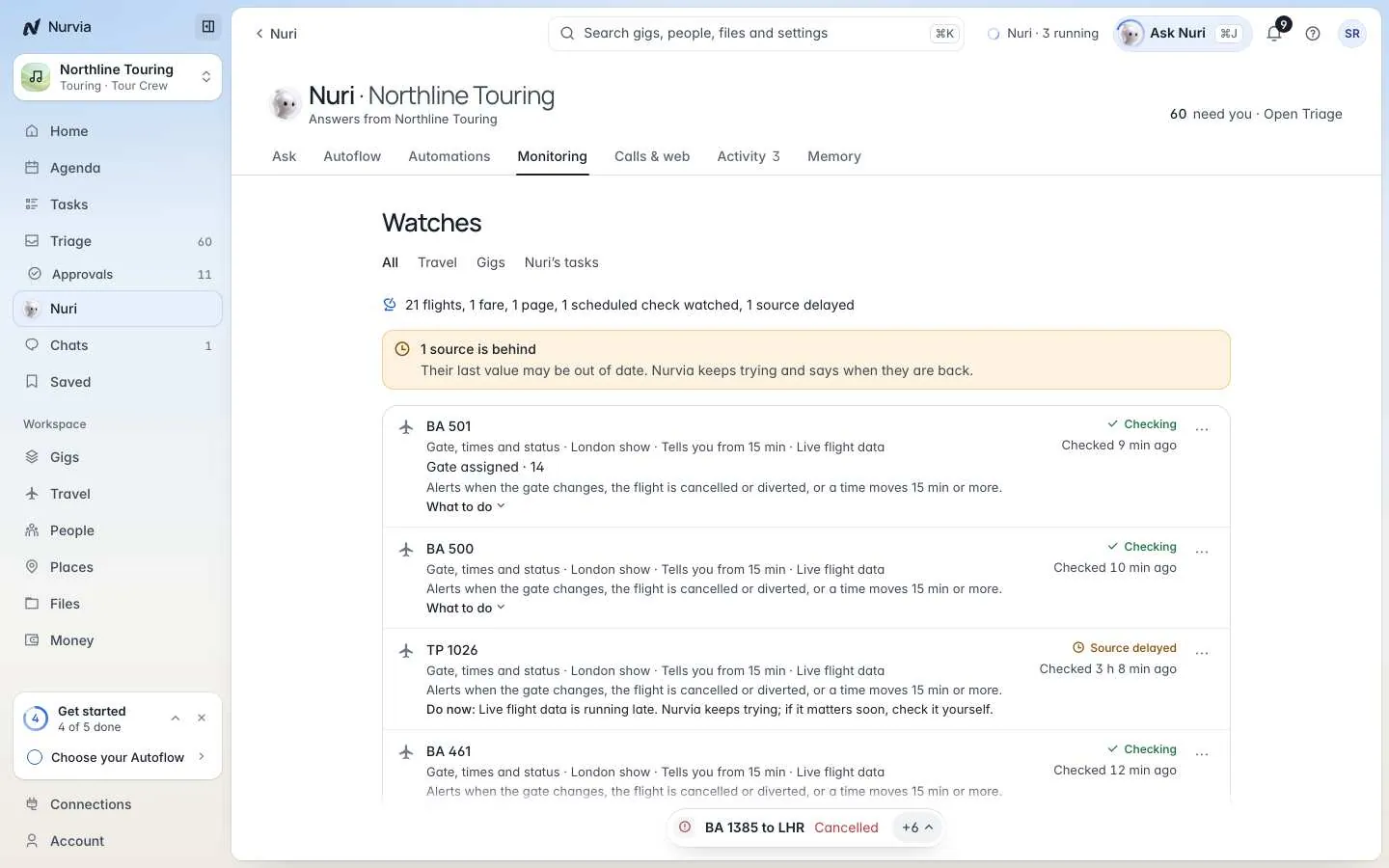
A watch is Nuri keeping an eye on something for you — a flight's delay, a fare, a plan or a web page — and telling you when it crosses a line you care about. You set it up by asking.
Where to find it
- Web — NuriMonitoring. Show All, Travel, Gigs or Nuri's tasks.
- iPhone — Watches in Nuri's menu.
Start a watch
Ask Nuri in plain words. Say what to watch and when you want to hear.
Tell me if TP 1350 is delayed more than 30 minutes.Watch fares from London to Berlin on 14 Nov and tell me if one drops under £200.Watch the venue's parking page and tell me when it changes.Nuri confirms what it will watch, how often it checks and when it will tell you.
Manage a watch
From a watch's ⋯ menu:
- Pause — nothing is checked until you Resume.
- Tell me from 15 min or Tell me from 30 min — the delay that triggers an alert (flights).
- Stop watching — ends it for good.
- Change with Nuri — reword it in the chat.
A watch that runs on a schedule also has Run now, which checks straight away and then goes back to its usual time.
What the states mean
| State | What it means |
|---|---|
| Checking | Running normally. The row shows when it last checked. |
| Source delayed | The data itself is late. Nurvia keeps trying and says when it's back. |
| Flight cancelled / Flight diverted | The airline changed the flight. Open it to see what to do. |
| Paused | Not checking until you resume. |
Flights on your plans are already tracked
Live status for flights on your plans starts three days before departure — you don't need a watch for that. Use a watch when you want an alert at a threshold you choose.
Related

Automations, routines and the brief
Reminders, document chases, routines on your clock, the morning brief and the inbox sweep — Nuri working on a schedule.
Calls and browser tasks
Have Nuri phone a venue or restaurant, or complete a task on a website — you confirm before anything starts and can step in at any time.