

Teams & settings
Where every setting lives on the web and iPhone — your account, Nuri, connections, workspaces, organization and billing.
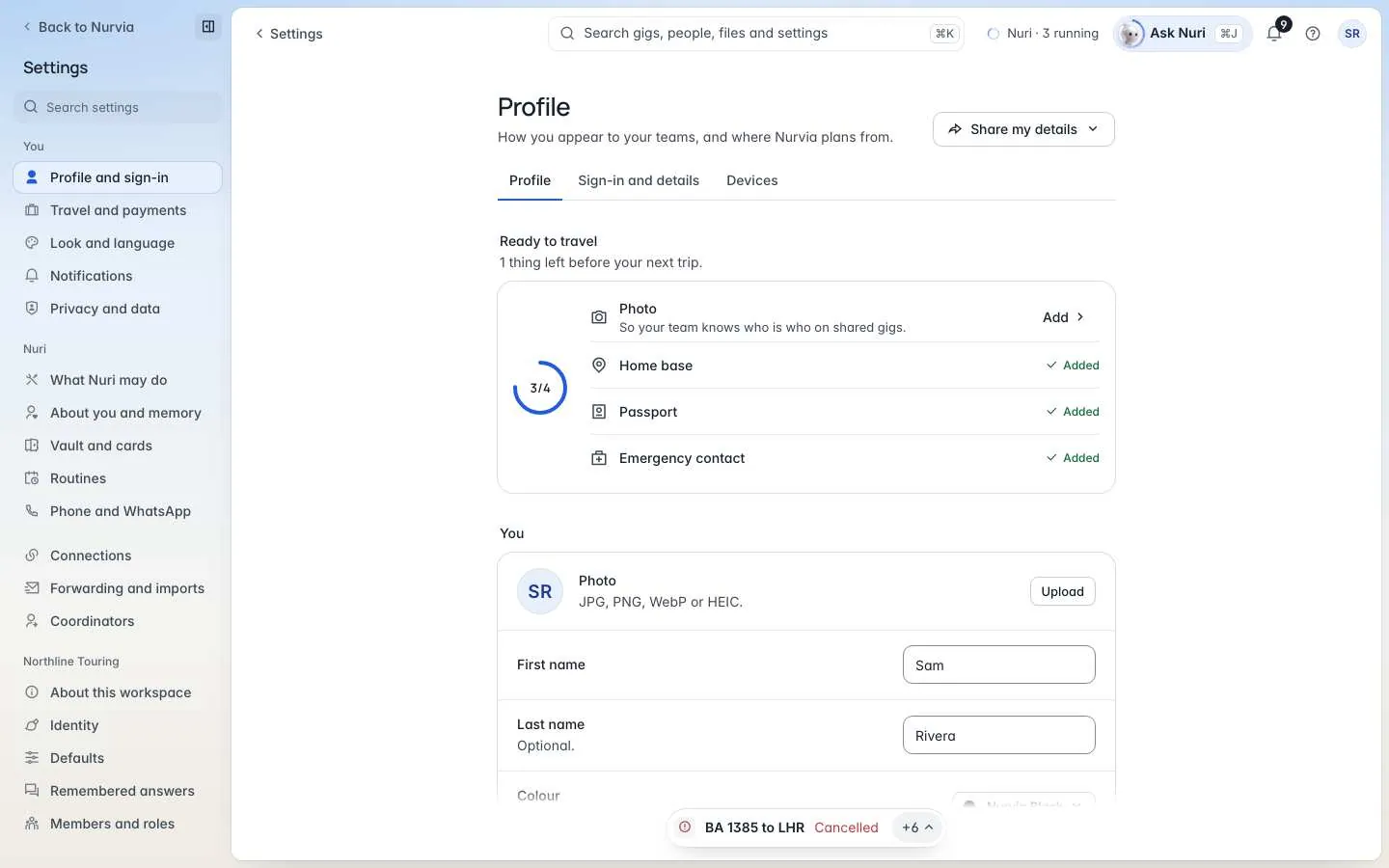
Settings are grouped by whose they are: yours first, then your Nuri, your connections, the workspace you're in, and your organization. Most settings follow your account, so a change on the web shows on your iPhone too.
Where to find it
Choose Account at the bottom of the sidebar, or press G then S. The sidebar switches to settings, with Back to Nurvia at the top.
Use Search settings at the top of the sidebar, or ⌘ K, to find any setting by what it does — "dark mode", "quiet hours", "passport".
What's in each group
| Group | Web | iPhone |
|---|---|---|
| You | Profile and sign-in · Travel and payments · Look and language · Notifications · Privacy and data | Account settings · Privacy & visibility · Notifications · Devices · Download your data · Travel preferences · Travel documents · Visa & stay limits · Appearance · Units & formats |
| Nuri | What Nuri may do · About you and memory · Vault and cards · Routines · Phone and WhatsApp | Approvals and access |
| Connections | Connections · Forwarding and imports · Coordinators | Connections · Email import |
| Workspace (named after your workspace) | About this workspace · Identity · Defaults · Remembered answers · Members and roles · Rules · Import and calendar · Announcements · Audit | Team settings |
| Organization | Organization | — |
| Billing | Plan and usage | Plan & billing |
| Help | Help and support | Help & FAQ · Contact support |
You only see what you can change
People who don't run a workspace see only About this workspace in its group. A Personal workspace has no members, roles or rules, so those pages don't appear for it.
Settings pages
 Account and sign-inProfile, password, two-step sign-in and devices.
 NotificationsPush, email, quiet hours and what breaks through.
 Look and languageTheme, density, units and time format.
 Privacy and dataVisibility, export, requests, trash and deleting your account.
 Travel and paymentsTravel profile, preferences, documents and visas.
 Nuri settingsWhat Nuri may do, memory, vault and routines.
 WorkspacesIdentity, words, defaults and creating or leaving a workspace.
 Members and invitesInvite people, groups and join requests.
 PermissionsAccess per area, presets and See it as.
 Rules and approvalsSpending policies, routing and saved lists.
 OrganizationMany workspaces, one organization.
 Billing and usageYour plan, usage and the beta.