Get started
Describe what you're organising, choose Personal or a team, and pick the word your plans go by.
A workspace keeps one group's plans, people and settings together. Your Personal workspace is just for you; a team workspace is for anything other people work on with you.
What you'll do: decide where your plan lives, and name the kind of plans it holds.
Sign in
Open nurvia.app/dashboard and sign in. New to Nurvia? Follow the Quickstart first — setup asks the same question as the next step.
Personal or a team?
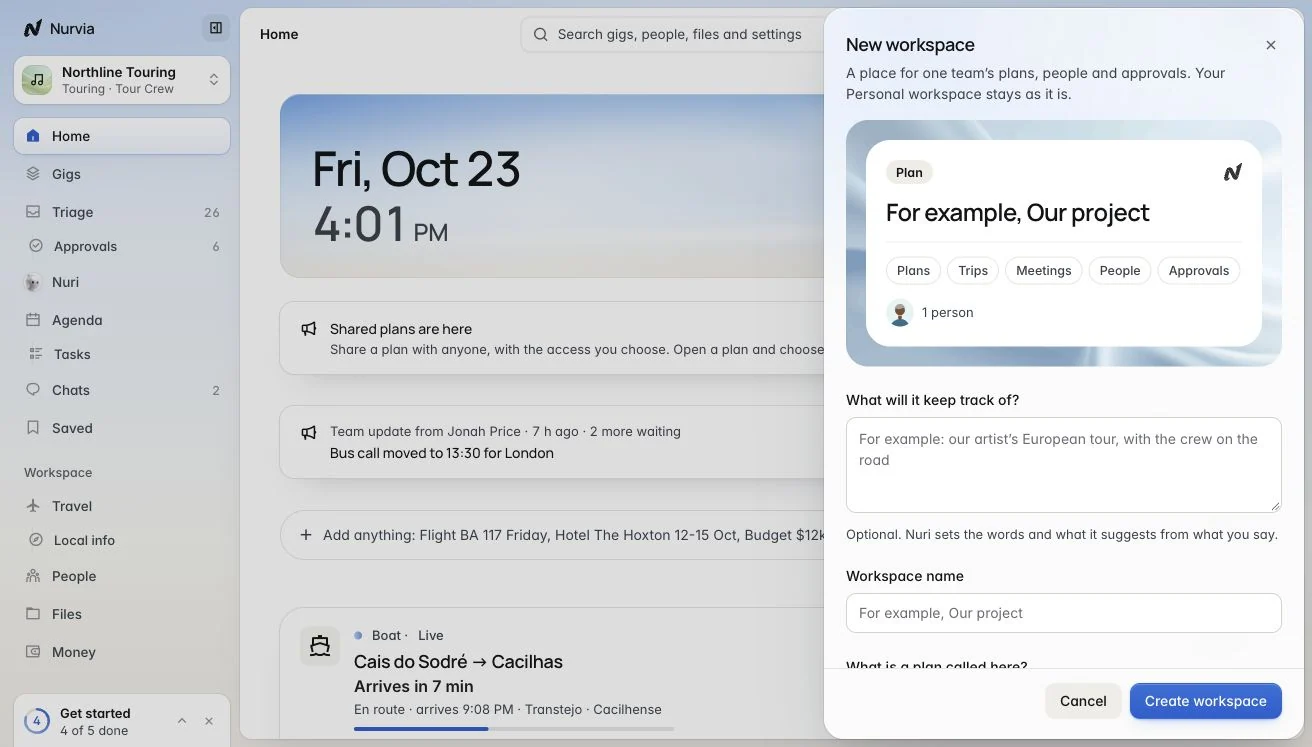
Planning just for yourself? Stay in Personal and skip to the next page. For anything with other people, click the workspace name at the top of the sidebar and choose New workspace.
Describe it and name it
Under What will it keep track of?, say what you're organising in your own words, then give it a Workspace name. Nurvia sets the workspace up from your answer.
Our team's offsites and client trips
Sara and Tom's wedding weekend
Northline Touring's shows and the crew's travel
Pick the word for your plans
Under What is a plan called here?, keep Plan or pick a word that fits — Trip, Event, Match or, for music, Gig. Then choose Create workspace. You can change the word later in SettingsIdentity.
You're done when
Your workspace shows at the top of the sidebar, and the button on Home uses your word — for example New plan or New trip.
On iPhone
Tap the workspace name at the top of Home and create a team, or stay in Personal. The same choices apply.