Teams & settings
Your travel profile, seat and cabin preferences, loyalty and trusted-traveller numbers, emergency contacts, documents and visas.
What Nurvia fills in when it books, checks in and looks after you on the road. Set it once and every booking starts from it. Changes save as you go.
Where to find it
| Platform | Path |
|---|---|
| Web | SettingsTravel and payments, with tabs for Travel profile, Preferences, Documents, Visas and days and payments. |
| iPhone | SettingsTravel preferences, SettingsTravel documents and SettingsVisa & stay limits. |
Travel profile
Preferences
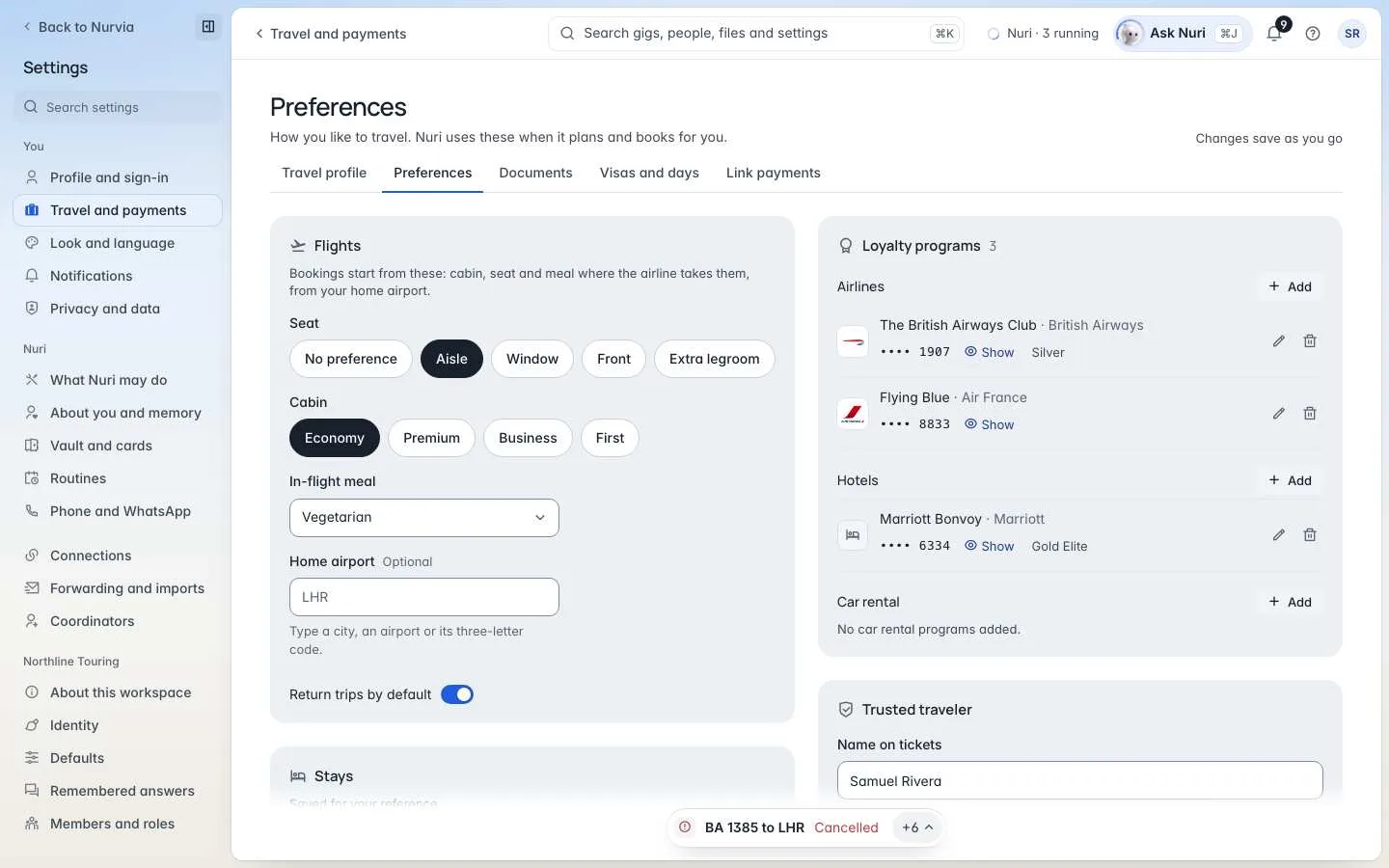
Flight preferences are where bookings start: cabin, seat and meal where the airline takes them, from your home airport. Nuri uses these when it plans and books for you.
Stays (bed, floor, a quiet room), your preferred ride app, dietary preferences and allergies, and travel notes are saved for your reference.
Documents and visas
Passports and travel documents are stored privately, and Visas and days tracks visas and day limits like Schengen 90/180. See Documents and visas.
Payments
Paid bookings always wait for your approval of the exact amount, and payment steps are handed back to you. See Payments and bookings.
Bookings are paid to the provider
Flights, stays and other bookings are paid to the airline, hotel or provider at their price. Nurvia never adds a booking or rebooking fee.