Email & calendar
Connect Gmail, Google Workspace or Outlook, choose where its bookings go, and manage, reconnect or disconnect accounts.
Connecting a mailbox is the quickest way to fill your plans: Nurvia reads new and past confirmations and files them for you. Connecting a calendar brings its events into Agenda, or puts your plans on it.
Where to find it
- Web — SettingsConnections, or Connections at the bottom of the sidebar.
- iPhone — SettingsConnections.
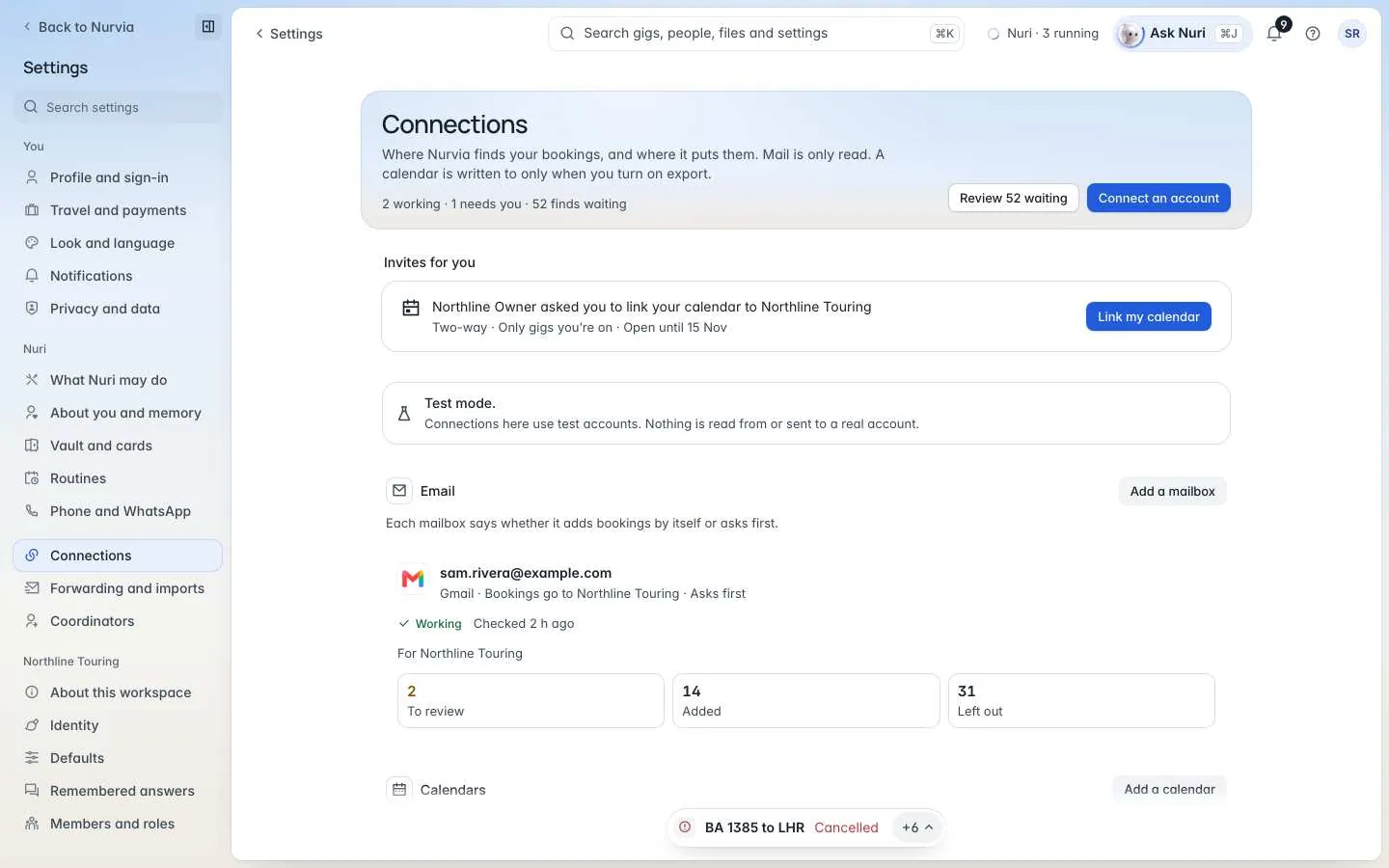
Connect an account
Choose what to connect
Choose Connect an account, then Email (find flights, stays and shows in your mail) or Calendar (put gigs on a calendar, bring its events in, or both).
Pick the account
Google — Gmail or Google Workspace mail, or Google Calendar. Microsoft — Outlook (personal or work), or the Outlook calendar.
Sign in with the provider
Sign in on Google's or Microsoft's own page. Nurvia never sees your password. Reading your inbox is separate from sending from it — Nuri only sends with your approval or a rule you set.
Choose where bookings go
Pick the workspace under Where should its bookings go?, then When Nurvia finds a booking: Adds automatically (confirmed bookings go straight in; anything unsure waits for you) or Asks first (every new find waits for you). Choose Done, or Set up later.
For a calendar you also choose Which calendar?, Link it to, Which way? and What comes in. See Calendars.
One mailbox, several workspaces?
Add an email rule for each workspace or artist. A mailbox's rules decide where each booking goes.
An account's page
Open a connected account to see What this mailbox brought in — To review, Added, Left out and Could not read — and, while it's catching up, Reading past emails. From there you can change:
- Bookings go to — the workspace, or For artists routing in agency workspaces. What it already added stays where it is.
- When Nurvia finds a booking — the same for every kind, or By kind (Ask before adding gigs, Ask before adding everything else).
- What comes in — the kinds of booking, Only confirmed bookings and Update what is already there.
- Access and disconnect — what Nuri may do with the account, and Disconnect.
Check now looks for new mail straight away. Link a calendar adds the same account's calendar.
A mailbox needs reconnecting?
Providers sometimes expire access. When that happens you'll see Reconnect on the account. Nurvia can't read new mail until you reconnect, but what it brought in stays and your rules are kept.
Disconnect
Disconnect first shows What stops — the rules that use the account. For a calendar, choose what happens to the Events Nurvia added: Keep the events (Nurvia stops updating them) or Remove the events Nurvia added. Your own events are never touched, and everything already in your plans stays.
Other ways in
- Forwarding — forward any booking to import@nurvia.cc. See Forwarding.
- Calendars and feeds — calendar links, feeds of your plans and phone calendars. See Calendars.
- Coordinators — let an assistant share bookings from their own mailbox. See Coordinators and other apps.
- All connections — the full catalogue. See Integrations.