

Email & calendar
Let assistants and coordinators share bookings from their own mailbox, see whose accounts feed a workspace, and connect chat, file and sheet apps.
Bookings don't always arrive in your inbox. A tour manager's assistant or an artist's coordinator often has them first. Coordinators let those people share bookings from their own mailbox — they choose what they share, and your team sees the booking details, not their email.
Where to find it
- Web — SettingsCoordinators (Coordinators and assistants).
- iPhone — SettingsConnections.
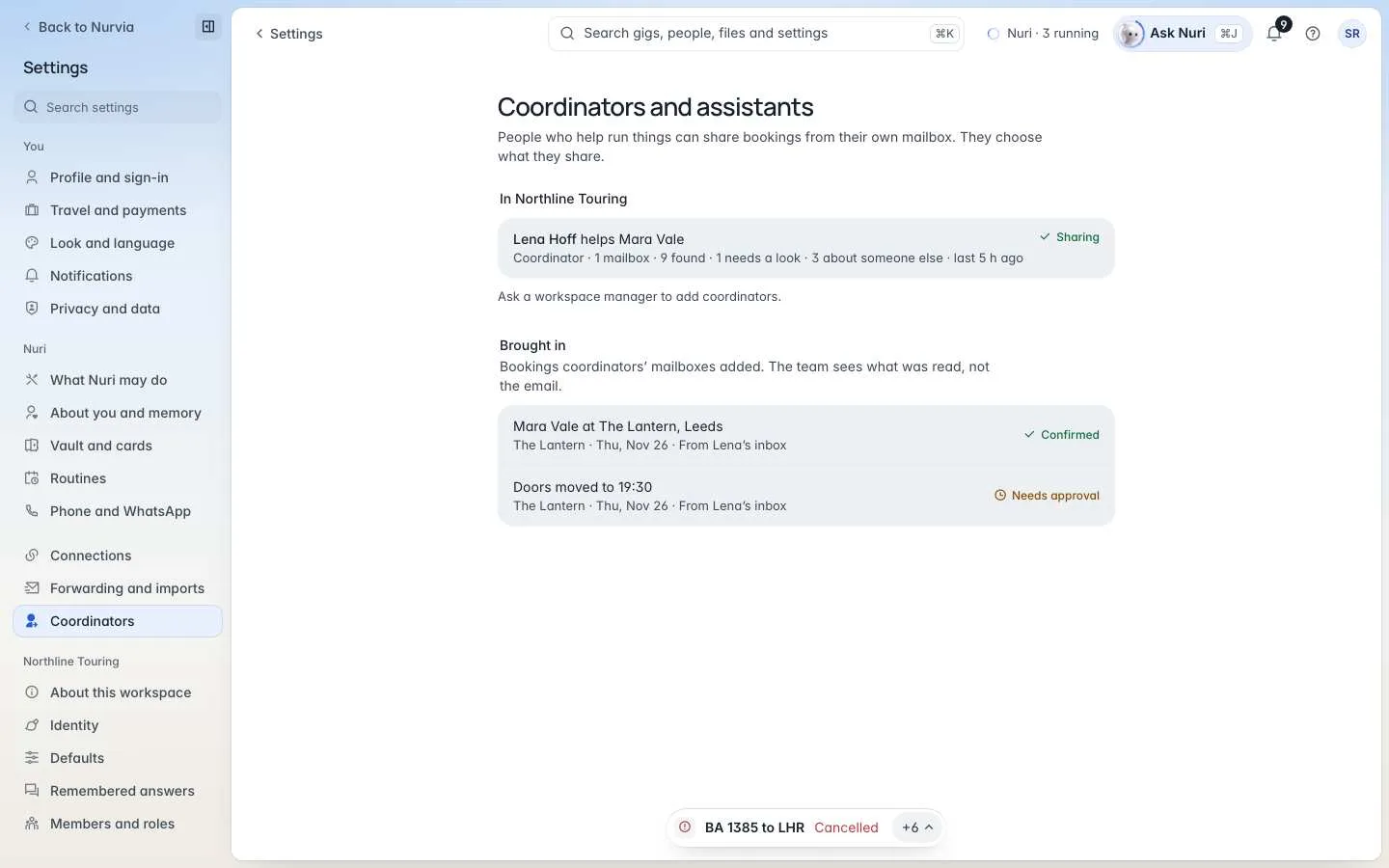
Add a coordinator
Invite them
In a team workspace, choose Add someone. Pick the Role — Coordinator or Assistant — and enter Their name and Their email.
Say who they help
Choose Who they help (someone in the workspace) and the Name to look for in their mail — an artist or act name, as it appears in bookings.
They choose what to share
They get an email, join the workspace, then choose which of their mailboxes to share. Nothing imports until they do.
Each coordinator shows their state — Sharing, Waiting for them, Paused or Removed — and how much they've found. Brought in lists the bookings their mailboxes added, with their status. If you can't add coordinators, ask a workspace Manager.
The team sees what was read, not the email
Nobody sees a coordinator's mailbox — only the booking details it found.
Whose accounts feed a workspace
SettingsWorkspaceConnected accounts lists whose own accounts feed the workspace — never what they read. Owners, Admins, Managers, Logistics members and assigned coordinators can feed a workspace.
Other apps
SettingsConnectionsOther apps connects chat, file and sheet apps such as Slack, Google Drive and Dropbox. Each asks for its own permission and starts with read access only. Reading an app is separate from posting to it — Nuri only sends or changes something there with your approval.
See Integrations for the full list.
Webhooks and API
Organizations can send events to Zapier, Make, n8n or their own endpoint, and create read-only API keys. See Organization.
Related



Calendar export and feeds
Put your plans into Apple, Google or Outlook calendars — one item at a time, as the Nurvia calendar, as a feed, or as a synced workspace calendar.
Workspace imports
For admins — set what a whole workspace imports from email and calendars, preview it as a dry run, run import jobs with spending limits, and undo from activity.